

Every developer I know has rebuilt the same chart, the same progress bar, and the same little status widget for the fourth time this year. That was the itch behind Prism. Here is how it went from a side idea to a product line, and what I learned along the way.
The Itch That Started It
For years, I kept running into the same wall. I needed a graph, or a chart, or some other visual, and I had no good way to get one. Sometimes I had a design system, but I did not like how it modeled its objects, so I would reach for a different one. Then I would fight that one for a while. It wore on me. Eventually it made me a little angry that no real solution existed for this.
I kept assuming I was not the only person with this problem. Turns out I was not, but at the time that was just a hunch.
Turning the Itch Into an MCP Server
The idea was simple enough to be dangerous. What if an MCP server could hand out exactly the component you asked for, at the moment you asked for it? The catalog would hold many types of items, and an agent or a developer could request one by name and get it back in a form that fit the project.
The key decision was to treat the catalog as the source of truth, not the agent. The model does not invent a chart from scratch every time. It asks for a chart that already exists, tested and consistent, and then the human decides what to do with the data. That keeps the output predictable, and it keeps the agent out of the business of making up UI details.
Here is the basic flow for the MCP side:
Prism v1.0 shipped as an MCP server with a catalog behind it. Nothing fancy in the first release. The goal was to prove that an agent could ask for a visual and get a good one back, and that the result would look the same every time someone asked for it.
Getting It in Front of Real People
Once v1.0 was out, I waited to see how people would use it. I was curious less about the code and more about what they reached for first.
It did not take long. A buddy from work started using Prism heavily, then a co-worker picked it up, and before long a bunch of people were using it. The useful part was who they were. None of them were professional developers or UI/UX engineers. That made them a good test group, because they were not judging the objects against a design system they already loved.
The feedback was consistent. People said it was the first time they could build an application and focus on the application logic instead of the visuals. For a tool like this, that is the result I wanted. Nobody needed a design lesson to get value out of it.
Taking It to the Terminal
I live in my terminal, so the next step was obvious. If a terminal app can use Prism to drop in UI elements, a plain CLI script can look a lot better with very little effort.
The first terminal version launched with around 250 items. Anything that could run in bash or Python could use them, as long as it executed. I figured that was the end of the road. I could not see a reason to do more.
The Stream Deck Detour
Then a teammate showed me a screenshot of Prism running on his Stream Deck. I had not considered it before, which was a little embarrassing, because I own two of them: a Stream Deck + and a Corsair Galleon 100 SD. I knew right away this was worth building.
The Stream Deck work is not one small plugin. It is two plugins that are designed to work together:
- Prism Deck renders the live, animated objects on the keys and dials.
- Prism Control handles the logic that decides what the deck should show and do.
Deck and Control make one interface. The point was not just to look good. The buttons have to actually work.
My biggest frustration with Stream Decks has always been setup. I hate configuring multiple pages of macros and plugins just to do basic things. That was the main problem I wanted to fix. The other part was making the buttons alive. You can show a live waveform at 60 FPS, which is a fun party trick, but I wanted more than a pretty button.
Prism: Kaleidoscope
This is where it gets bigger. Prism: Kaleidoscope is the fully customizable, fully autonomous Stream Deck experience I am working on. Here is the default view right after install. Nothing is configured yet, and it already looks like this:
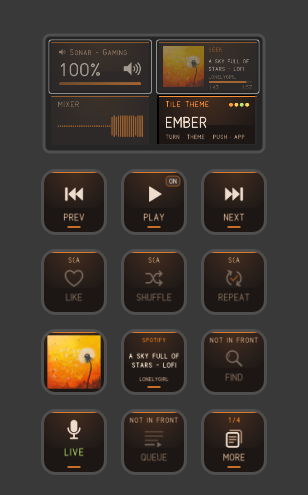
The part I am most interested in is context. The deck watches what you are doing and changes with you. A few examples:
- Writing and research. You move from a word processor into a browser to look something up for your paper. The keys swap from copy, paste, cut, fonts and justification to tabs, URL tools, back, forward and refresh. The new layout is ready in about the time it takes to click into the other app, because it is already loaded.
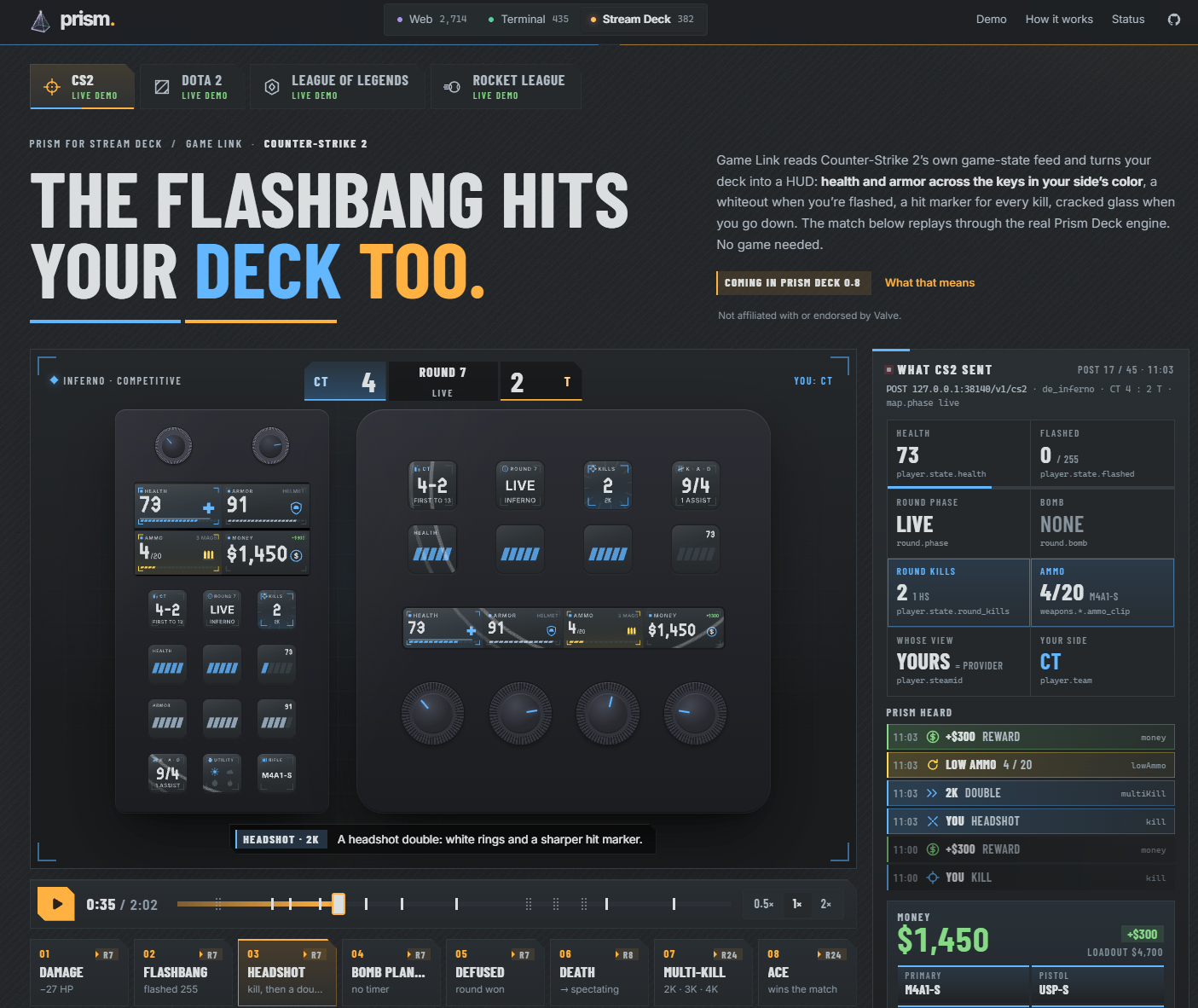
- Games. Game Link reads a game's own state feed and turns the deck into a heads-up display. Here is the Counter-Strike 2 demo running through the same Prism Deck engine:
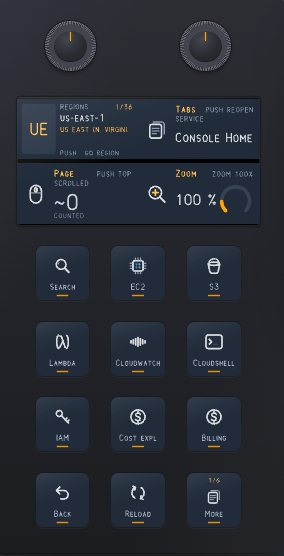
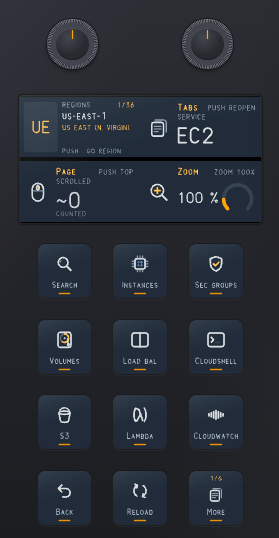
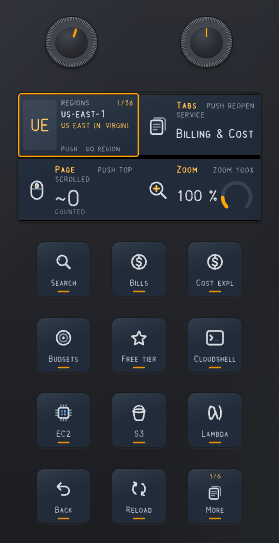
- Cloud consoles and the AWS CLI. This is the setup I use most. When you are inside a management console or typing AWS CLI commands in a terminal, the deck builds a layout around that context: search, service shortcuts, region, back and reload, and page controls.
Here is the console and CLI layout, one screen at a time. First the console home:
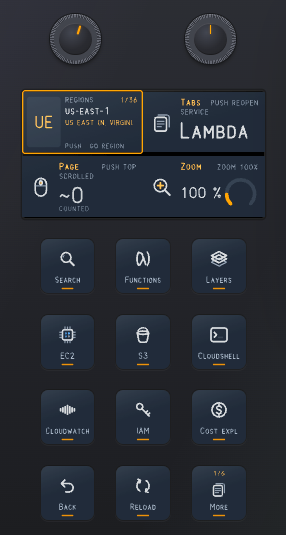
Then Lambda, where the layout shifts to Lambda-related keys and the service display changes to match:
Next, EC2, with security groups, volumes and load balancers on the keys:
Billing and cost pages get their own layout, with budgets, free tier and cost explorer:
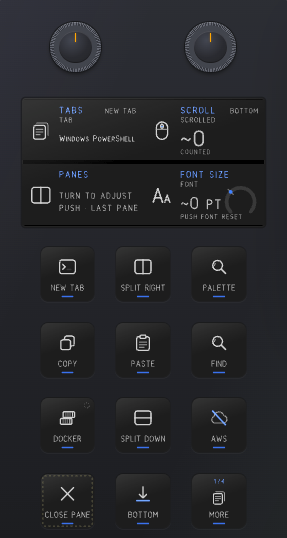
And from the terminal side, the deck shows tabs, split panes, copy and paste, and AWS shortcuts while you work in PowerShell:
Why This Is the Cool Part
Here is why I think this is more interesting than another macro pad. You can see it in the pictures: the same services show up in the same places, whether you are on the console home, in Lambda, or in EC2. The keys are not random. They are the things you reach for in that context, and they stay put, so your hands learn where they are.
The second part is that nobody has to hand-build those pages. In the old way, you would open the Stream Deck software, drag actions onto a grid, make a page for each service, wire up the back button on every page, and then do it all again when the console changed. With Prism, the layout comes from the same catalog of parts that the MCP server and the terminal use. A key is an object. A panel is an object. The deck is just another place to draw them.
The third part is the one I did not expect. Every piece of this is a decision the computer can make from information it already has. It knows which service page you are on. It knows which region is selected. It knows which terminal tab is in front. Asking you to configure those things again is just busywork. I would rather it figure them out and show me the right keys.
Building It Was the Hard Part
Each layout has to detect the current context, switch cleanly, and keep the same keys in the same places so your muscle memory does not break. Change the layout too often and the deck gets in your way. Change it too rarely and you are back to hunting for buttons on the wrong page.
What's Next
Prism is now a complete product line, and the rest of it is going live shortly. My goal is to spend less time programming and more time gaming.
Some use cases should be built by humans. Most of what a computer asks you for, though, is content it already knows. Which service you are in, which region you are looking at, which tab is open. Why not let the machine handle that and let people do the parts they are good at?
Kaleidoscope will be sold in the Elgato store once the final version has been tested completely. Keep an eye on the product line to see when each feature hits the public. Trust me, you do not want to miss this one.
Bottom Line
The short version: Prism started as a fix for a personal annoyance, a catalog of UI objects an agent can hand out on request. It worked well enough that I took it to the terminal, and then to the Stream Deck. The lesson I keep coming back to is simple. Keep the agent working from a known catalog of parts, and let the human make the decisions.
Have you built a tool for yourself that got bigger than you planned? What was the moment it stopped being a side project, and did you keep going?
Further reading
- Prism site: the product pages, live demos and Stream Deck details
- Prism on GitHub: the MCP server and catalog source